kagent: AI Agents for Kubernetes with Ollama
I wanted an AI assistant that could actually interact with my cluster. Not a chatbot that generates YAML, but something that can query Prometheus, inspect pods, check Helm releases, and reason about what's happening in the cluster. kagent does exactly that.
The interesting part: the LLM doesn't run in the cluster. It runs on a separate machine with a GPU, served by Ollama. kagent just points to it over the network.
The setup
Two machines involved:
The cluster runs on a Proxmox mini PC with 96 GB RAM. This is where kagent, the agents, and all the Kubernetes tooling live.
The GPU machine is a desktop with an AMD Ryzen 7 9800X3D and an NVIDIA RTX 3080. It runs Ollama serving the Qwen3 8B model. Nothing else. It sits on the same network.
I actually tried running everything in the same cluster first. Ollama running as a pod, no GPU, pure CPU inference. It worked, technically. But the response times were brutal. A simple question that should take a few seconds was taking minutes. The model was competing with real workloads for CPU and memory, and without a GPU the inference is just painfully slow. It wasn't usable for anything interactive.
Offloading inference to a dedicated machine with a GPU made it a completely different experience. The cluster resources stay free for actual workloads, and the model responds in seconds instead of minutes.
What is kagent
kagent is a cloud-native AI platform built specifically for Kubernetes. It deploys as a set of components:
- A controller that manages agent lifecycle and orchestration
- A UI for interacting with agents through a web interface
- Specialized agents that each have tools and context for specific domains
- MCP (Model Context Protocol) servers that expose Kubernetes APIs as tools the LLM can call
The agents aren't generic chatbots. Each one has a focused set of tools:
| Agent | What it does |
|---|---|
| k8s-agent | Inspects pods, deployments, services, events, logs |
| helm-agent | Lists releases, checks values, inspects chart status |
| observability-agent | Queries Prometheus, checks alerting rules, reads metrics |
| promql-agent | Writes and validates PromQL queries |
When you ask a question, the agent decides which tools to call, executes them against the real cluster, and uses the results to build a response. It's function calling, not prompt engineering.
Installing with Helm
kagent ships as two Helm charts: kagent-crds for the Custom Resource Definitions and kagent for the actual components. Both come from the same OCI registry.
The wrapper Chart.yaml:
apiVersion: v2
description: kagent - Cloud Native Agentic AI for Kubernetes
name: kagent
version: 0.0.1

dependencies:
  - name: kagent-crds
    version: 0.8.6
    repository: oci://ghcr.io/kagent-dev/kagent/helm
  - name: kagent
    version: 0.8.6
    repository: oci://ghcr.io/kagent-dev/kagent/helm
This follows the same pattern as every other addon in the homelab: a Helm chart wrapper with a config.json that ArgoCD picks up via ApplicationSets.
ArgoCD discovers it, creates the Application, and syncs it. No manual helm install.
Pointing to Ollama
The key configuration is the provider block. Instead of using OpenAI or any cloud API, kagent points directly to the Ollama instance on the GPU machine:
providers:
  default: ollama
  ollama:
    provider: Ollama
    model: "qwen3:8b"
    config:
      host: http://192.168.xx.xx:11434
      options:
        num_ctx: "8192"
num_ctx: 8192 sets the context window. Qwen3 8B supports up to 32K, but 8K is enough for most Kubernetes interactions and keeps memory usage reasonable on the 3080's 10 GB VRAM.
Ollama needs to be accessible from the cluster network. In my case, the GPU machine is on the same LAN, so it's just a direct HTTP call. No VPN, no tunneling. Ollama listens on 0.0.0.0:11434 by default when configured with OLLAMA_HOST=0.0.0.0.
Choosing the agents
kagent comes with a lot of agents, but not all of them are relevant for my setup. I enabled four and disabled the rest:
agents:
  k8s-agent:
    enabled: true
  helm-agent:
    enabled: true
  observability-agent:
    enabled: true
  promql-agent:
    enabled: true
  istio-agent:
    enabled: false
  kgateway-agent:
    enabled: false
  argo-rollouts-agent:
    enabled: false
  cilium-policy-agent:
    enabled: false
  cilium-manager-agent:
    enabled: false
  cilium-debug-agent:
    enabled: false
No Istio, no Cilium, no Argo Rollouts in the homelab. No point running agents for things that don't exist in the cluster. Each disabled agent is one less deployment consuming resources.
Exposing the UI
The kagent UI is exposed via Envoy Gateway at kagent.ruiz.sh, following the same pattern as other services in the cluster.
The HTTPRoute:
apiVersion: gateway.networking.k8s.io/v1
kind: HTTPRoute
metadata:
  name: kagent
  namespace: kagent
spec:
  parentRefs:
    - name: homelab
      namespace: envoy-gateway-system
      sectionName: https
  hostnames:
    - "kagent.ruiz.sh"
  rules:
    - backendRefs:
        - name: kagent-ui
          port: 8080
One thing that caught me: LLM responses are slow. The default Envoy timeouts would kill the connection before the model finished generating. A BackendTrafficPolicy with generous timeouts fixes that:
apiVersion: gateway.envoyproxy.io/v1alpha1
kind: BackendTrafficPolicy
metadata:
  name: kagent-timeout
  namespace: kagent
spec:
  targetRefs:
    - group: gateway.networking.k8s.io
      kind: HTTPRoute
      name: kagent
  timeout:
    http:
      requestTimeout: 600s
      connectionIdleTimeout: 600s
      maxConnectionDuration: 600s
    tcp:
      connectTimeout: 30s
600 seconds (10 minutes) for request timeout. Sounds excessive, but complex queries where the agent chains multiple tool calls can take a while, especially with an 8B model that's not as fast as a cloud API.
Resource allocation
Everything runs on the large tier node. No CPU limits (same pattern as the rest of the cluster), only memory limits:
| Component | Memory request | Memory limit |
|---|---|---|
| Controller | 128Mi | 512Mi |
| UI | 128Mi | 512Mi |
| Tools (MCP servers) | 128Mi | 512Mi |
| Each agent | 128Mi | 512Mi |
| Bundled PostgreSQL | 128Mi | 256Mi |
kagent uses PostgreSQL to store conversation history and agent state. For a homelab, the bundled PostgreSQL with 1 Gi of storage is fine. In production you'd want an external database.
The OpenAI secret
Even though I'm using Ollama as the default provider, kagent still expects an OpenAI API key in some code paths. An ExternalSecret syncs it from Doppler:
apiVersion: external-secrets.io/v1
kind: ExternalSecret
metadata:
  name: kagent-openai
  namespace: kagent
spec:
  refreshInterval: 1h
  secretStoreRef:
    name: doppler
    kind: ClusterSecretStore
  target:
    name: kagent-openai
    creationPolicy: Owner
  data:
    - secretKey: OPENAI_API_KEY
      remoteRef:
        key: OPENAI_API_KEY
This also gives the option to switch providers later without redeploying. Just change the default provider in the values and the key is already there.
Why Qwen3 8B
A few reasons:
- It fits comfortably in the RTX 3080's 10 GB VRAM
- Good at function calling, which is what kagent relies on heavily
- Fast enough for interactive use (not instant, but acceptable)
- Open source, no API costs, no rate limits
Bigger models like 70B would need more VRAM than the 3080 has. Smaller models like 1.5B struggle with complex tool-calling chains. 8B is the sweet spot for this hardware.
What works well
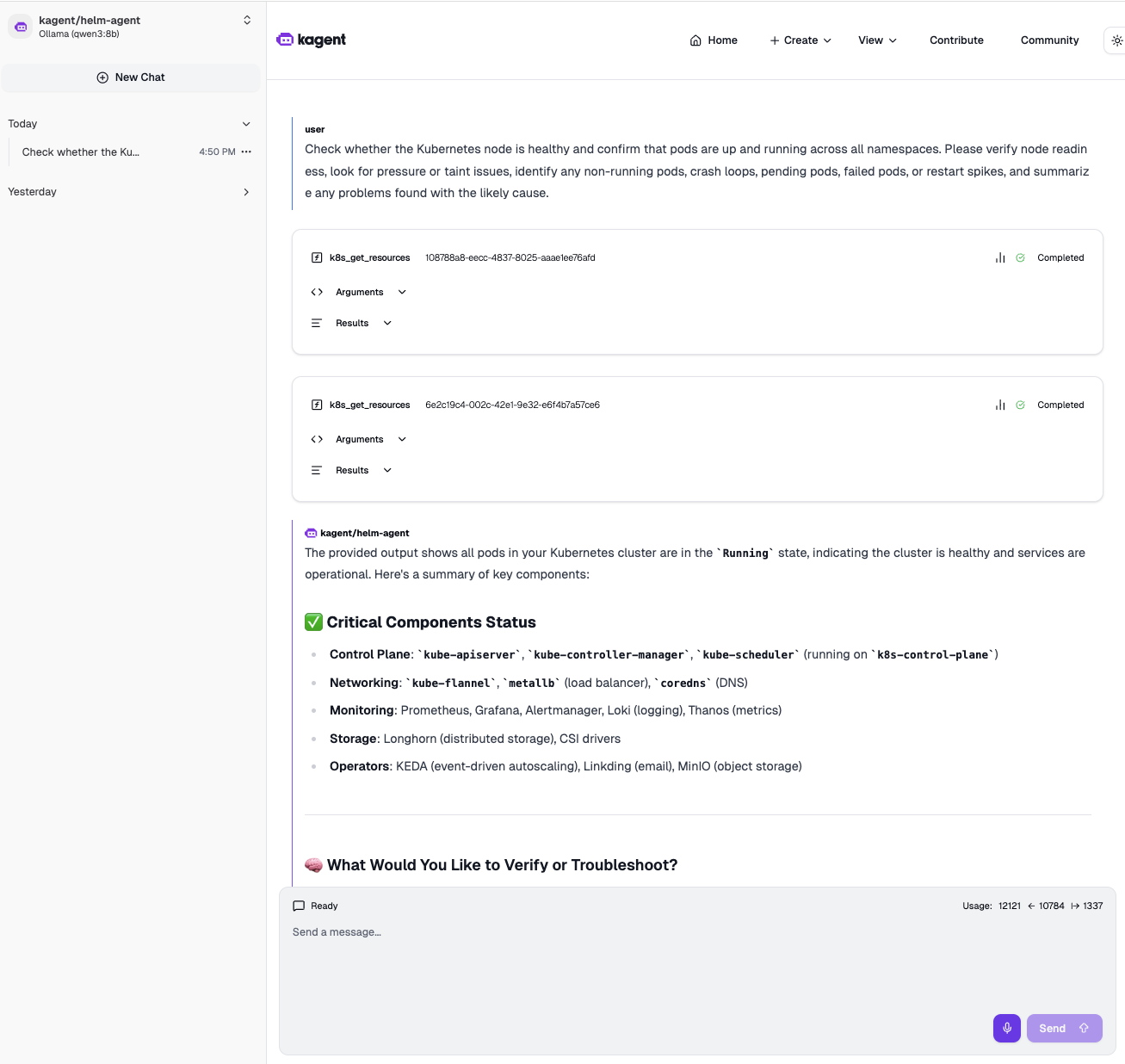
The screenshot above is from a real interaction. I asked the k8s-agent to check whether the nodes are healthy, confirm pods are running across all namespaces, look for pressure or taint issues, identify crash loops, pending or failed pods, restart spikes, and summarize any problems with the likely cause. One prompt, and the agent chained multiple tool calls on its own: checked node readiness, scanned all namespaces for pod status, and came back with a structured summary.
The observability-agent can query Prometheus and explain what the metrics mean. The helm-agent knows which releases are deployed and their status. Ask "is Loki healthy" and the agents will check the pods, verify if metrics are being scraped, and give you a combined picture.
What to watch out for
Latency. An 8B model on a consumer GPU is not GPT-4. Responses take a few seconds, and complex multi-tool queries can take 30-60 seconds. The 600-second timeout exists for a reason.
Context window. 8K tokens fills up fast when the agent is pulling pod descriptions, logs, and metric results. If you ask broad questions ("what's wrong with the cluster"), the context can overflow and the model starts hallucinating or dropping information. Specific questions work much better.
Network dependency. If the GPU machine is off or Ollama crashes, kagent is useless. There's no fallback configured. Adding the OpenAI provider as a fallback is on the todo list.
Running AI agents inside the cluster that can actually observe and reason about the cluster state is a different experience from copy-pasting YAML into ChatGPT. The model is smaller and slower, but it has real access to real data. And it runs entirely on hardware I own, on my network, with no data leaving the house.